Voice coding on Mac: how to dictate prompts to Cursor, Claude Code and ChatGPT
AI coding tools now take instructions in plain English, and plain English is easy to say out loud. Here is how to set up voice prompting on a Mac, how to structure what you say, and where the keyboard still wins.
By the Crodo team · Updated · 8 min read
How do you code by voice on a Mac?
To code by voice on a Mac, speak your prompts to an AI coding tool instead of dictating code itself. Claude Code has a built-in /voice command, Cursor has a microphone in its agent chat, and macOS Dictation or a dictation app types into any of them. Give context, goal, constraints and a done-when check, then review before sending.
Why does voice work for AI coding?
Because the input is now prose. When an agent writes the code, your job is to describe what you want, and speaking makes it cheap to add context and constraints. Dictating raw syntax is still slow and error-prone.
Andrej Karpathy coined vibe coding on X in February 2025, and the same post described talking to Cursor's Composer through SuperWhisper so he barely touched the keyboard, as quoted in Martin Fowler's write-up. Cursor and Claude Code now ship their own voice input.
Prompts are paragraphs, which is what speech is good at. A typed prompt shrinks to “fix the login bug”; a spoken one easily carries the extra sentence about which file, what you tried and what must not change.
Syntax is another matter. Apple's dictation commands include “open brace” and “underscore”, but Apple lists “quote” as typing a curly quote mark and “dash” as an en dash, which most programming languages reject.
| Part of the prompt | Voice or keyboard | Why |
|---|---|---|
| Goal, context, constraints | Voice | More detail helps |
| File and function names | Either | Type them if dictation mangles them |
| Code, regex, shell commands | Keyboard | Symbols and spacing break |
Which voice options work for coding on a Mac?
There are three: the voice input built into your coding tool, macOS Dictation, or a system-wide dictation app. Built-in options work only in their tool; the other two type into any app, including editors and terminals.
| Option | Works in | Audio | Jargon help | Cost |
|---|---|---|---|---|
| Claude Code /voice | Claude Code (CLI, VS Code) | Streamed to Anthropic | Project and branch hints | Paid Claude plan (Pro: $20 a month) |
| Cursor voice input | Cursor agent chat | Not stated in docs | Not documented | Built into Cursor |
| ChatGPT dictation | ChatGPT apps, including Mac | Sent to OpenAI | Dictionary in the Codex app | Desktop Voice needs Plus, Pro or a workspace plan |
| macOS Dictation | Anywhere you can type | Can be on device | None documented | Free |
| System-wide app | Any text field | Local or cloud, by app | Often a dictionary | Free to paid, by app |
The trade-off is reach against fit. Claude Code's /voice is tuned for coding terms but works only in Claude Code; macOS Dictation and dictation apps cover Cursor, a terminal and ChatGPT with one shortcut. Our comparison of AI dictation apps shows which run locally.
Apple says Dictation stops after 30 seconds without speech. With macOS 27 Golden Gate (released 14 September 2026), Apple added a new on-device model for more accurate Dictation, available on Macs with an M3 or later chip and at least 12GB of unified memory.
How to turn on voice input in Claude Code
Run /voice, then hold Space while you talk and release to insert the text. It needs a Claude.ai sign-in rather than an API key, sends audio to Anthropic for transcription, and in this default hold mode waits for Enter unless you turn on autoSubmit.
- 1
Sign in with a Claude.ai account (/login). An ANTHROPIC_API_KEY or a provider such as Amazon Bedrock takes precedence and hides /voice.
- 2
Run /voice and allow the microphone prompt for your terminal app (or enable it under System Settings > Privacy & Security > Microphone).
- 3
Hold Space. After a brief warm-up your words appear in the prompt as you speak.
- 4
Release to insert the text, read it, then press Enter. Esc cancels a recording in progress.
- 5
Rather not hold a key? /voice tap starts and stops with single taps and sends any transcript of three words or more.
Anthropic says transcription does not count towards Claude usage limits. Dictation supports 20 languages and does not work over SSH or in cloud sessions. In tap mode, recording stops after 15 seconds of silence or two minutes in total.
How do you dictate prompts to Cursor?
Click the microphone icon in Cursor's agent chat input, or press and hold Ctrl+M in the Agents Window. Cursor advises speaking naturally, including file and function names, and reviewing the transcription before sending.
Cursor 3.1 (13 April 2026) moved voice input to transcribing the whole clip in one batch, which Cursor says is more accurate. Version 3.19 added automatic language detection, and voice submit keywords can send the prompt for you. Cursor's docs do not say where the audio is transcribed.
Since Apple says Dictation works anywhere you can type, macOS Dictation can also fill Cursor's chat box, or ChatGPT's, and so can system-wide dictation apps.
How should you structure a spoken prompt?
Say four things in order: the context (what exists now), the goal (the one change you want), the constraints (what must not change) and a done-when check (how you will check it). These sentences cost seconds and stop the agent guessing.
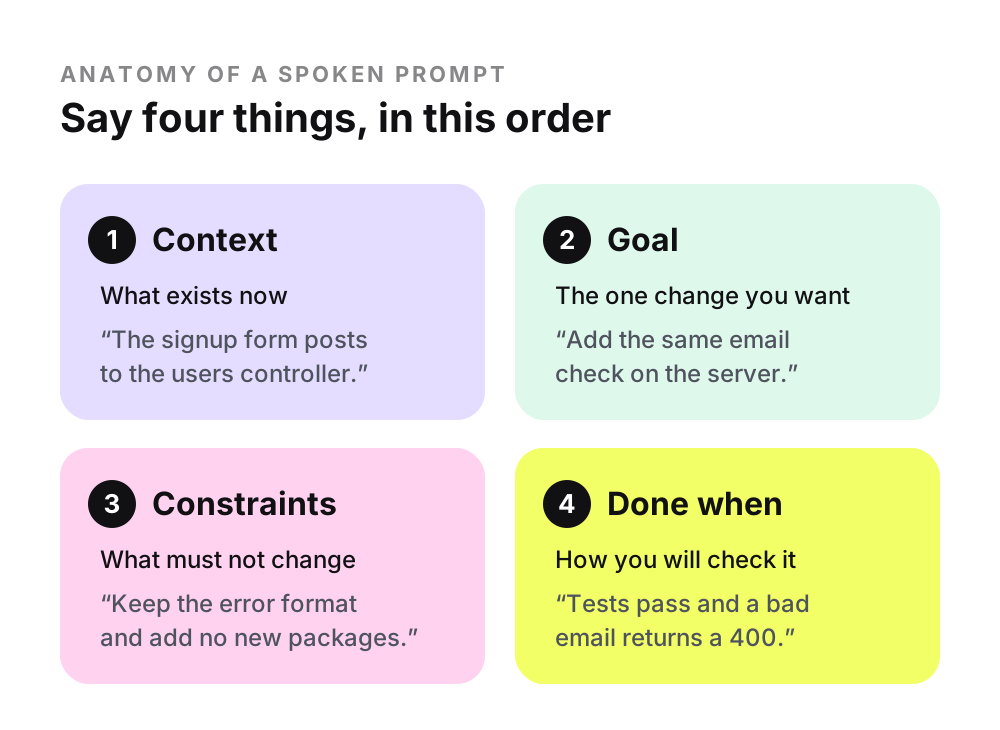
Typed, this task is often just “add email validation to signup”. Spoken, with all four parts:
That gives the agent a place to look, a scope, two limits and a test to run, which matches OpenAI's advice for Work and Codex: the outcome, plus files, constraints and review criteria. A few “ums” do little harm; a wrong file name does.
How do you get identifiers and jargon right?
Teach your dictation tool the words it mishears, and describe code in plain language where you can. The usual trouble spots are names: functions, libraries and acronyms that come out as ordinary words.
- Claude Code is tuned for terms like regex, OAuth and JSON, and adds your project and git branch names as recognition hints.
- OpenAI's Codex app added a dictation dictionary for names, file paths and code symbols on 5 May 2026.
- macOS Dictation has no documented word list. Voice Control's Vocabulary holds up to 1,000 terms, but standard Dictation is unavailable while Voice Control is on.
- Dictation apps often keep a custom dictionary; see adding custom words to Mac dictation.
When a name keeps failing, describe it (“the function that formats cart prices”) and let the agent search, or type it. Claude Code lets you mix typing and speech, so dictate the sentence and type the @-mention.
Why review the transcript before you send it?
Because a misheard word in a prompt becomes a wrong change in your code. Read for names, numbers and negatives before pressing Enter: a dropped “not” reverses the instruction.
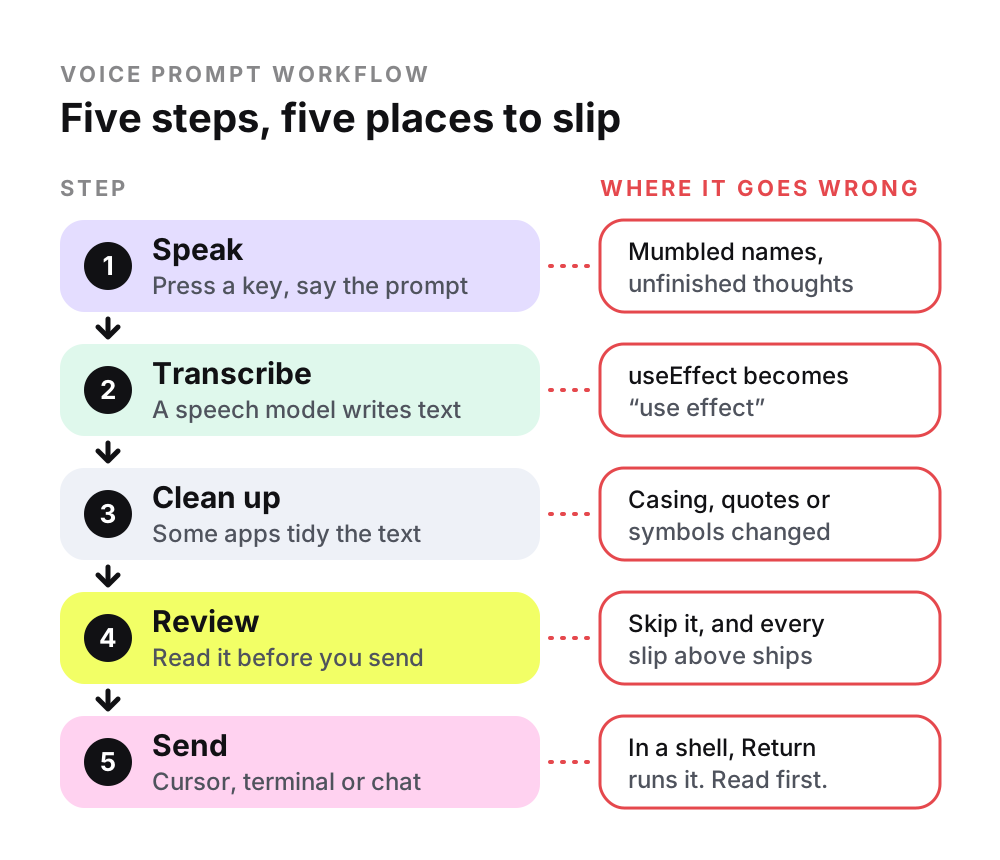
Claude Code waits for Enter by default, though tap mode and the autoSubmit setting send once a transcript reaches three words. Cursor's voice submit keywords send the prompt when spoken, while ChatGPT returns dictation as editable text. Leave automatic sending off until you trust how a tool hears you.
How do you dictate safely into a terminal?
Dictate prompts into Claude Code, not commands into a bare shell. A shell runs whatever you send when you press Return, so read every dictated command first and never dictate a destructive one to run unseen.
- Multi-line prompts: in Claude Code, use \ then Enter (any terminal) or Shift+Enter (Apple Terminal, iTerm2, Ghostty, Warp). Apple says the spoken “new line” is equivalent to pressing Return, which in a terminal can mean send.
- The ! prefix: text starting with ! puts Claude Code into shell mode, even when pasted into an empty prompt, and shell-mode commands run without Claude approving them.
- Permissions: recent Claude Code versions start in auto mode, where a classifier reviews actions instead of you. Press Shift+Tab to switch to Manual mode, which asks before editing files or running shell commands (apart from a built-in set of read-only ones).
- Destructive commands: describe the outcome (“delete merged branches”) and, in Manual mode, read the command the agent proposes before approving it.
What happens to your code when you dictate prompts?
With cloud transcription, your audio goes to the provider's servers, on top of the prompt text going to the AI model. Check your company's policy before talking about proprietary code, and use on-device dictation when audio must stay on your Mac.
- Claude Code streams audio to Anthropic; it is not processed locally.
- ChatGPT keeps dictation audio while the chat is in your history and deletes it within 30 days of you deleting the chat, with some exceptions.
- Cursor does not document where voice input is transcribed.
- macOS Dictation shows in Keyboard settings whether general dictation is processed on your device.
A cloud-based dictation app adds a second company to the chain: it receives the audio, then the coding tool's provider receives the prompt.
Questions
What is vibe coding, and where does voice come in?
Vibe coding is Andrej Karpathy's term, coined on X in February 2025, for building software by prompting an AI and testing the result without looking at the code. His original post described talking to Cursor's Composer through SuperWhisper so he barely touched the keyboard. Voice suits careful, reviewed AI coding too: it changes how you instruct, not whether you check.
Does Claude Code support voice input?
Yes. Claude Code's built-in /voice command turns on dictation in the CLI and its VS Code extension: hold Space to talk, or switch to tap mode. It requires a Claude.ai sign-in (Claude Code comes with paid Claude plans, from Pro at $20 a month) and streams audio to Anthropic for transcription. It does not work over SSH or in cloud sessions.
Does Cursor have built-in voice input?
Yes. Cursor's agent chat has a microphone icon for dictating prompts, and since Cursor 3.1 (April 2026) you can press and hold Ctrl+M in the Agents Window. Later versions added automatic language detection. Cursor's documentation does not say where the audio is transcribed, so ask Cursor if that matters for your work.
Can you write actual code by voice on a Mac?
You can, but it is slow. macOS Dictation has spoken commands for symbols such as “open brace” and “underscore”, and Voice Control can operate the whole Mac. Some commands type typographic characters, such as curly quotes, that break code. With an AI coding tool, speak the intent and let the agent type the syntax.
Does voice prompting work with ChatGPT on a Mac?
Yes. ChatGPT's microphone icon sends your recorded prompt to OpenAI for transcription and returns editable text you can check before sending. The desktop app on macOS also has a live Voice mode in Work and Codex on Plus, Pro, Business, Edu and Enterprise plans. macOS Dictation or a dictation app also types into ChatGPT like any text field.
Sources
- Claude Code Docs: Voice dictation
- Claude Code Docs: Interactive mode (multiline input and shell mode)
- Claude Code Docs: Configure permissions
- Claude Code Docs: Choose a permission mode (auto and Manual)
- Claude: Plans and pricing
- Cursor Docs: Prompting agents (voice input)
- Cursor changelog 3.1: upgraded voice input, 13 April 2026
- Cursor IDE release notes (voice changes in 3.19 and 3.22)
- OpenAI Help Center: Voice dictation FAQ
- OpenAI Help Center: ChatGPT Work and Codex
- ChatGPT and Codex changelog (dictation dictionary, 5 May 2026; desktop Voice, 23 July 2026)
- Apple Support: Dictate messages and documents on Mac (macOS 27)
- Apple Support: Commands for dictating text on Mac (macOS 27)
- Apple Support: Use a custom vocabulary with Voice Control on Mac (macOS 27)
- Apple: Apple Intelligence (improved Dictation, M3 and 12GB requirement)
- MacRumors: macOS 27 Golden Gate roundup (release date)
- Martin Fowler: Vibe Coding